Shiply Hotfix FAQ
1. After integrating RFix, build fails with: 'XXX cannot be cast to java.util.function.Supplier'?

Solution: Specify the Guava version in build.gradle at the project root:
buildscript {
    dependencies {
        // Added to resolve Android plugin cast exception: java.util.function.Supplier
        // https://github.com/GoogleCloudPlatform/artifact-registry-maven-tools/issues/27
        classpath 'com.google.guava:guava:27.1-jre'
    }
}
2. Tinker patch build fails with: 'XXX which is not in loader class'?

2.1. Root Cause
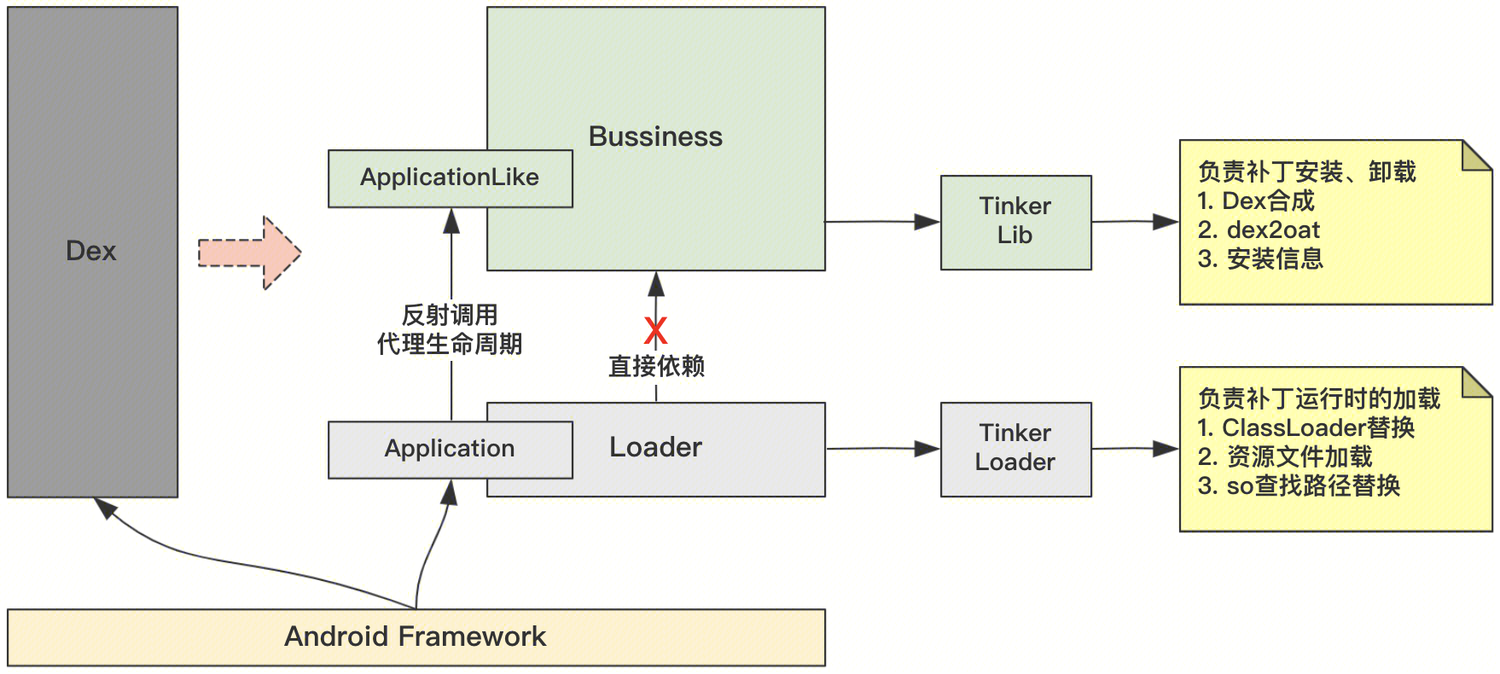
The diagram below shows Tinker's structure. During Application refactoring, app Dex is split into two parts and Application is proxied via ApplicationLike.
This structure requires that Loader classes cannot directly access Business classes. The patch build tool analyzes class dependencies and fails if such dependencies exist.
2.2. Behaviors That Cause This Dependency
2.2.1. Automatic instrumentation tools (analytics, behavior monitoring, component replacement, etc.)
The exception below occurs when Matrix performance monitoring instruments functions, causing Loader classes to depend on Matrix classes.

Solution: Configure allowlists on the component causing instrumentation to ignore these packages:
com.tencent.rfix.loader.*
com.tencent.tinker.loader.*
2.2.2. Business logic in Application
After ApplicationLike proxying, Application should not contain business logic. However, some scenarios (e.g., overriding Application methods)
require business logic in Application, creating Loader-to-Business dependencies and patch build failures.
Solution: Encapsulate the dependency logic in a separate class and invoke it via reflection to remove direct class dependencies.
3. How to deliver patches for multi-architecture builds (32+64+mixed)?
3.1. Option 1: Unified build, unified delivery
RFix supports multiple old.apk and new.apk parameter groups. The patch build diffs all pairs and produces one patch package.
The delivery system still delivers one package; the client selects the appropriate sub-package after download.
RFix configuration:
RFixPatch {
// Single-architecture packaging
    oldApk = "${projectDir.absolutePath}/RFix/old.apk"
    newApk = "${projectDir.absolutePath}/RFix/new.apk"
    // Multi-architecture packaging
    oldApks = ["${projectDir.absolutePath}/RFix/old.apk",
               "${projectDir.absolutePath}/RFix/old64.apk"]
    newApks = ["${projectDir.absolutePath}/RFix/new.apk",
               "${projectDir.absolutePath}/RFix/new64.apk"]
}
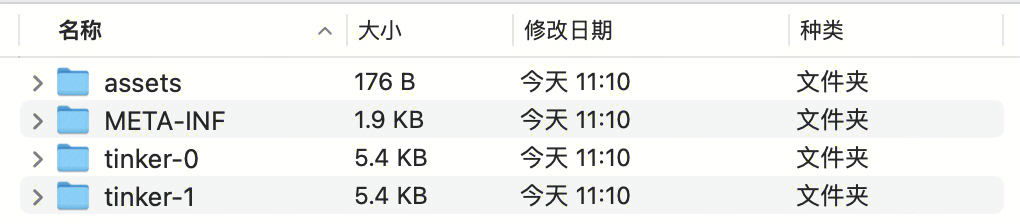
RFix patch package structure:
3.2. Option 2: Unified build, on-demand delivery
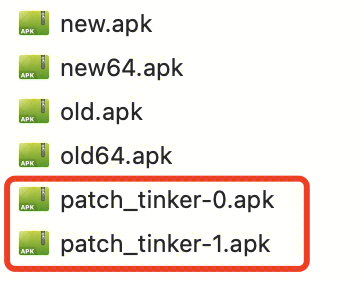
Based on Option 1, split the built patch into multiple independent patch packages.
The delivery system provides multiple URLs; the client downloads the appropriate patch.
Note: This option optimizes CDN cost for patch delivery. Skip if you don't need it.
RFix configuration:
RFixPatch {
    buildConfig {
        // Enable independent patch packaging
// Supported since version 1.1.0+
        enablePackageSeparate = true
    }
}
RFix patch artifacts:
3.3. How to build multi-architecture patches
Step 1: Prepare old.apk, old64.apk, and their mapping.txt and R.txt files.
Note: Do not mix up obfuscation mapping files.
Step 2: On the patch branch, build new.apk and new64.apk separately.
Note: applyMapping and applyResourceMapping do not distinguish 32/64 bit. Ensure the correct mapping files when building new.apk and new64.apk.
Step 3: After placing both artifact sets in the configured paths, run RFixBuildRelease.
4. RFix patch package too large?
4.1. Root Cause
Patch creation is essentially a diff between old and new APKs. To extract true code changes,
new.apk is built with old.apk's obfuscation files (mapping.txt, R.txt) so unchanged code and resources stay identical.
However, applying old obfuscation alone may not guarantee consistency, leading to oversized patches.
4.2. Factors Affecting Patch Size
4.2.1. new.apk built without old.apk obfuscation rules
Common during initial integration before understanding why obfuscation rules must be applied.
4.2.2. Obfuscation rule changes on the patch branch
Changing obfuscation on the patch branch prevents affected classes/functions from reusing old.apk's mapping.txt,
causing large class/function diffs and potentially affecting dex splitting strategy.
4.2.3. Auto-instrumentation performance monitoring (e.g., Matrix)
Matrix inserts function calls at the start of each function and assigns numbers.
The same function may get different numbers across builds, introducing large diff code.
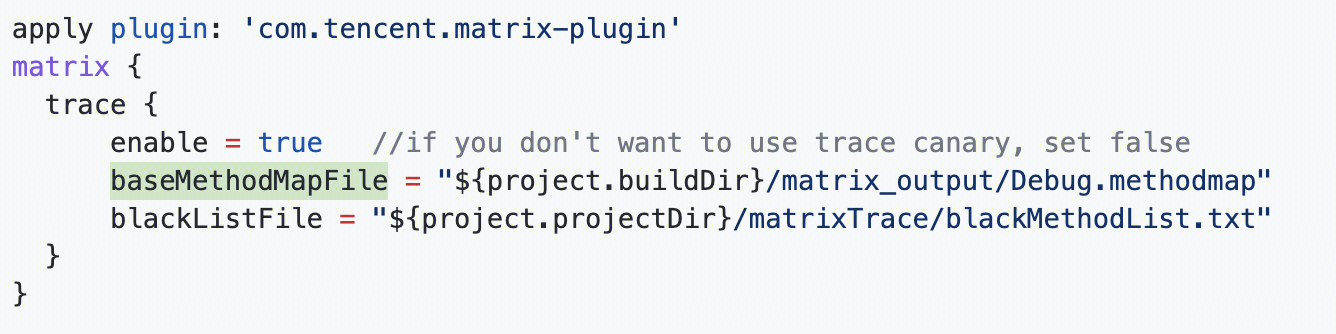
Solution: Back up methodMap after building old.apk and use the old methodMap when building new.apk.
4.2.4. Third-party APK compression tools (e.g., AndResGuard)
AndResGuard obfuscates resource files by compressing resource names to reduce APK size.
Obfuscation rules may differ each build, causing large patch diffs.
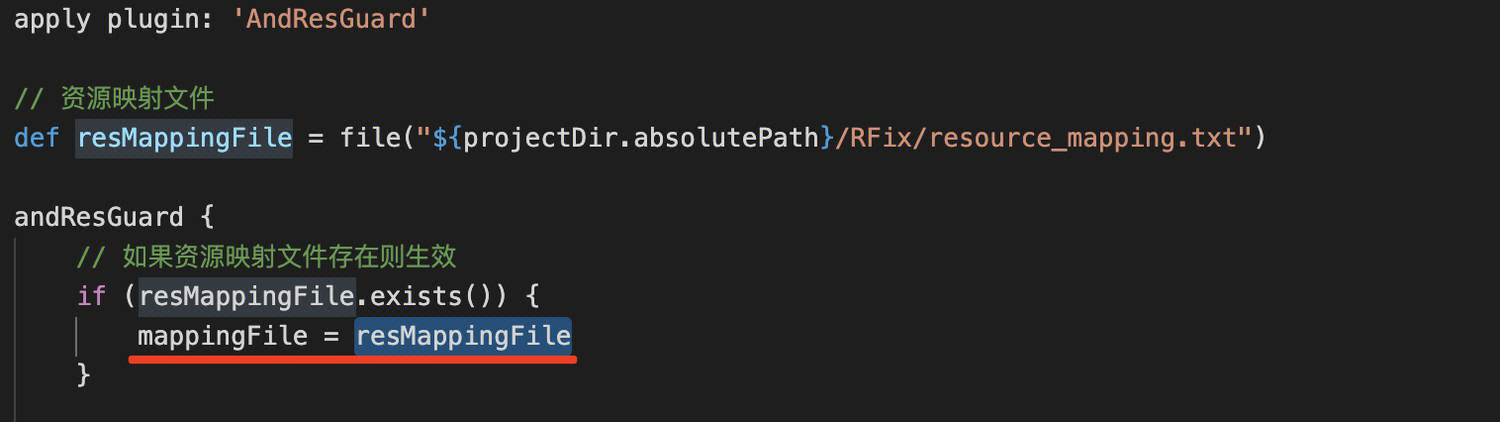
Solution: AndResGuard generates a resource obfuscation mapping after building old.apk; configure new.apk to use it for consistent obfuscation.
5. How to extract mapping.txt and R.txt from build artifacts?
Different AGP versions store artifacts in slightly different locations. Obfuscation file extraction failures are common during AGP upgrades.
[gradle/android-auto-backup.gradle] can automatically back up patch build artifacts—refer to or use this script.
6. Hardened app fails to load patches (Legu)?
6.1. Root Cause
Hardened APKs cannot properly extract Dex from the package, so hardened APKs cannot be used for DexDiff.
Patches built from hardened APKs will not load correctly at runtime.
6.2. Solution
Note: Only needed when deep hardening is enabled (hiding original APK dex, so, res). Otherwise no special handling is required.
Step 1: Patch build pipeline must use non-hardened old.apk and new.apk (hardened APKs cannot extract original data).
Step 2: Configure RFix patch build parameters to mark the patch for hardened apps:
RFixPatch {
    buildConfig {
        // Whether the app is hardened
        isProtectedApp = true
    }
}